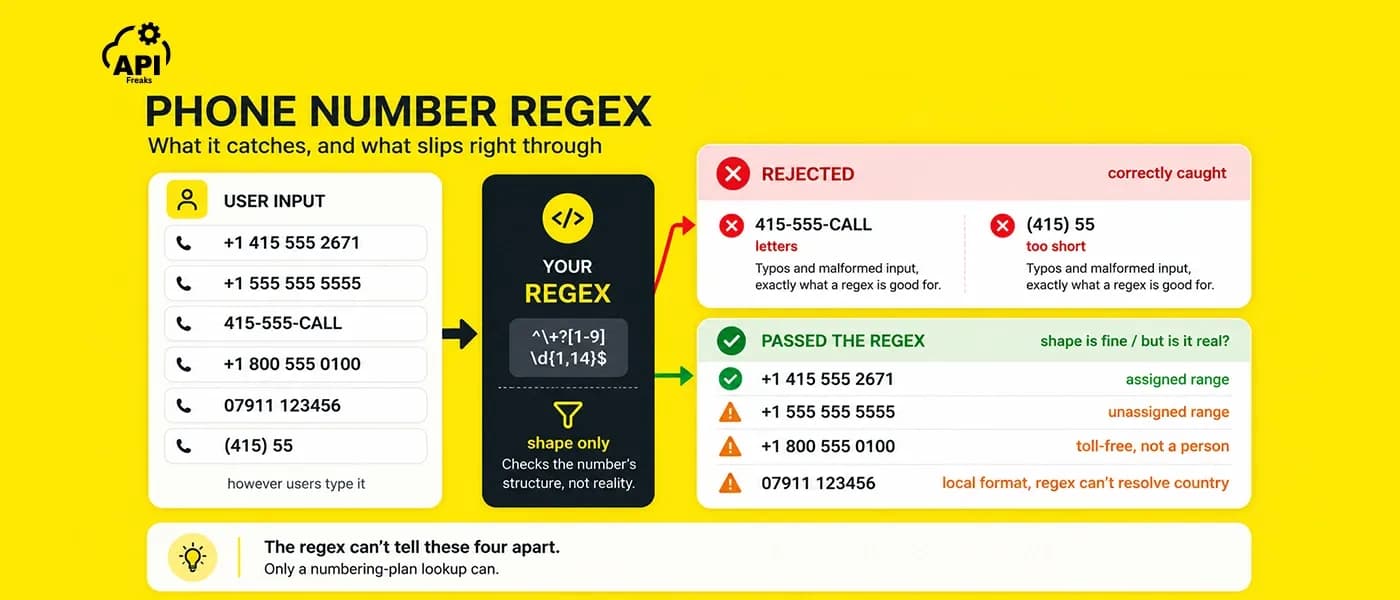

You shipped a phone number regex on your signup form. It passed review, matched every test case, and went to production. Weeks later the support queue fills up: welcome texts bouncing, one-time passcodes never arriving, accounts registered to numbers that look fine but answer to nobody. The regex works exactly as written. It's still the wrong tool for the job.
A regex checks the shape of a number, not whether it exists, whether it can receive an SMS, or whether it's a throwaway VoIP line. This guide hands you a working phone number regex up front, then shows the one distinction every tutorial skips (possible vs valid), the four formats you need to store and display numbers, the twelve line types that decide deliverability, and where an API takes over.
Key Takeaways
- A phone number regex checks format, not existence. It confirms a string looks like a number, not that the number is real, reachable, or a mobile.
- Possible vs valid is the bug regex ships:
+1 555 555 5555has a legal shape but sits in an unassigned range. Regex only ever proves possible. - No single regex covers every country. Validate international input against E.164 (
^\+[1-9]\d{1,14}$) and defer real validity to a maintained dataset. - Store numbers in E.164, display them in National or International format, and build
tel:links from RFC3966. - Line type decides deliverability: a valid
VOIPorFIXED_LINEnumber can still drop your SMS silently. Twelve categories exist, includingTOLL_FREEandPREMIUM_RATE. - This is numbering-plan validation, not an HLR lookup. It confirms a number is real and assigned, not that a handset is switched on, which is what keeps it fast and free of per-carrier fees.
A Phone Number Regex That Works
Let's start where you are. You need a pattern, and you need it to do a specific job. Pick based on what you're validating, not on which regex is "most complete." The most complete pattern is also the most wrong, as we'll see.
US numbers (NANP)
This handles the common North American formats: (415) 555-2671, 415-555-2671, 415.555.2671, 4155552671, and the +1 variants, while enforcing the two structural rules in the North American Numbering Plan actually cares about: neither the area code nor the exchange code may start with 0 or 1.
// Accepts (415) 555-2671, 415-555-2671, 415.555.2671, 4155552671, +1 415 555 2671
const usPhone = /^(\+?1[-.\s]?)?\(?([2-9]\d{2})\)?[-.\s]?([2-9]\d{2})[-.\s]?(\d{4})$/;

usPhone.test('(415) 555-2671');  // true
usPhone.test('+1 415 555 2671'); // true
usPhone.test('115-555-2671');    // false: area code can't start with 1
Any country (E.164)
If you accept international input, stop trying to describe every national format and use an E.164 regex instead. It's the international standard for e164 phone number format: a +, a country code, and up to fifteen digits total, with no spaces or punctuation.
// E.164: + followed by a non-zero digit, then up to 14 more digits
const e164 = /^\+[1-9]\d{1,14}$/;

e164.test('+14155552671');   // true  (US)
e164.test('+447911123456');  // true  (UK / Channel Islands)
e164.test('+919876543210');  // true  (India)
e164.test('14155552671');    // false: no leading +
Flexible capture (clean it up yourself)
When you want to accept whatever a human types (brackets, dots, spaces) and normalize afterward, validate loosely on shape and strip the rest before storage:
// Shape-only: a leading + is optional, digits and common separators allowed
const flexible = /^\+?[0-9][0-9().\-\s]{5,20}[0-9]$/;

const raw = '+1 (415) 555-2671';
if (flexible.test(raw)) {
  const digits = raw.replace(/[^\d+]/g, ''); // "+14155552671"
}
If you need to validate a phone number in JavaScript on the client and re-check it with a Python phone number regex on the server, here's the same pattern in both.
import re

US_PHONE = re.compile(r'^(\+?1[-.\s]?)?\(?([2-9]\d{2})\)?[-.\s]?([2-9]\d{2})[-.\s]?(\d{4})$')
E164 = re.compile(r'^\+[1-9]\d{1,14}$')

bool(US_PHONE.match('(415) 555-2671'))  # True
bool(E164.match('+919876543210'))       # True
bool(E164.match('+0123456789'))         # False: country codes never start with 0
That's a genuine, working phone number regex for the three cases that cover most forms. It will catch fat-fingered input, missing digits, and letters where numbers belong.
The Bug Every Phone Regex Ships: Possible vs Valid
Run this through the E.164 pattern above:
e164.test('+15555555555'); // true
It passes. It's the right length, it starts with a valid country code, every character is legal. And it is not a real phone number. Area code 555 was never assigned to a geographic region in the North American Numbering Plan; it's the fictional-number space you've seen in movies. The string is structurally plausible but does not exist in the numbering plan.This is the distinction that decides whether your validation works, and it has two names worth learning:
- Possible: the number has a workable length and a legal prefix structure for its country. This is the most a regex can tell you.
- Valid: the number matches an assigned range in that country's official numbering plan. This is what you meant when you wrote the regex.

Every regex tops out at "possible." It matches characters; it has no table of which ranges a country has actually allocated, and no way to stay current as ranges change. So, a valid-looking number in an unassigned range sails straight through. That is the bug: the form accepted +1 555 555 5555 because, structurally, nothing was wrong with it.
A proper validator separates these two states explicitly. APIFreaks Phone Validation API, for example, returns them as two distinct booleans:
{
  "possible": true,
  "valid": true,
  "country_code": "US",
  "national_number": 4155552671
}
You gate account creation on valid. You can use possible more gently, to tell a user "that doesn't look finished" and let them fix a typo before you reject them outright, instead of bouncing a real customer over a missing digit. A single flag "is this valid: true/false" check throws that nuance away. The two-level answer is the difference between a validator that blocks fake numbers and one that also annoys real people.
Why One Regex Can't Cover the World
The moment your form accepts a second country, the "one perfect regex" dream dies. Three things break it, and none of them are fixable with a longer pattern.
Subscriber length varies by country. A US national number always follows the 10-digit phone number format. A UK number is ten or eleven digits including the trunk 0. French mobiles are nine digits after the trunk code; German numbers vary in length within Germany.
Trunk prefixes disappear in international format. When a UK user writes their number locally, they'll type 020 7946 0958; that leading 0 is a trunk prefix used only for domestic dialing. In E.164 the same number is +442079460958; the 0 is gone. A regex has no idea which leading digits to strip for which country, because the rule is different in every country.
Number ranges are allocated in non-contiguous blocks. Within one country, some prefixes are mobile, others are landline, others are premium-rate or toll-free, interleaved in ways only a maintained dataset track. A pattern can't infer "this prefix is a mobile" from the digits alone.
This is also why "phone number format" is a per-country question, not a universal one. A quick sense of the spread:
Country | Example (national) | Example (E.164) | National length |
United States | (415) 555-2671 | +14155552671 | 10 digits |
United Kingdom | 020 7946 0958 | +442079460958 | 10 digits (after trunk 0) |
Germany | 030 12345678 | +493012345678 | variable |
India | 098765 43210 | +919876543210 | 10 digits |
Australia | 0491 570 156 | +61491570156 | 9 digits (after trunk 0) |
If you're building a form for a single market, a tuned national pattern plus the possible-vs-valid caveat is a reasonable floor. The instant you accept international input, the honest move is to validate against E.164 for shape and defer real validity to a dataset that knows each country's plan. Trying to encode the world in a regex produces a pattern that is simultaneously enormous, unreadable, and wrong.
libphonenumber: Offline Validation with the Same Numbering-Plan Model
If you'd rather not call an API, Google's libphonenumber is the library every experienced developer reaches for, and it's what most AI assistants will recommend when you ask this question. It parses input against per-country numbering-plan metadata, separates possible from valid the same way described above, and classifies numbers into the same twelve line types and four output formats you'll see in the rest of this guide; embedding it is a legitimate way to get shape-plus-plan validation offline. The trade-off is operational rather than technical: the metadata lives inside your build, so every service that validates numbers has to ship a library update each time a numbering plan changes, and the core library returns no carrier (its optional offline carrier mapper covers a limited set of mobile ranges and has the same portability blind spot as any prefix-based source). A validation API keeps that dataset-maintained server-side and returns carrier, location, and time zone alongside the same classification, in one response, with nothing to redeploy.
The Four Output Formats: Store One, Display Another, Link a Third
Once you've validated a number, you must decide what to keep, and how to format a phone number for each place it appears. This trips up more teams than the validation itself, because the same number has four legitimate written forms and they are not interchangeable.
Here they are for a single US phone number format, straight from a validation response, the same number rendered as E.164, international phone number format, national, and a tel: link.
"formats": {
  "E164": "+14155552671",
  "International": "+1 415-555-2671",
  "National": "(415) 555-2671",
  "RFC3966": "tel:+1-415-555-2671"
}
Format | Example | Use it for |
E.164 | +14155552671 | Storage, database keys, and API calls. Globally unique, no separators, unambiguous. |
International | +1 415-555-2671 | Display to a global audience. Human-readable, carries the country context. |
National | (415) 555-2671 | Display to same-country users. How locals expect to see it. |
RFC3966 | tel:+1-415-555-2671 | tel: click-to-call links in HTML, and SIP applications. |

The single rule that keeps a phone column sane: store E.164, format at render time. E.164 is the one representation that's globally unique and free of display cruft, so it's the correct database key. A VARCHAR(16) holds any number (15 digits plus the +). If you instead store what the user typed, you end up with (415) 555-2671, 415.555.2671, and +1 415 555 2671 as three separate rows for one person, and your deduplication, your dialer integration, and your "have we texted this number" logic all quietly break.
The tel: form deserves a specific mention because it's the one people hand-roll and get wrong. RFC3966, the tel: URI scheme defined in RFC 3966, is the standard behind click-to-call. Drop it straight into an anchor's href and tapping the number on a phone starts the call.
Line Type: The Twelve Values That Decide Whether You Can Text a Number
Here's the field that fixes the problem you shipped the regex to solve. A number can be perfectly valid and still be unreachable by SMS, because validity says the number exists, and line type says what kind of line it is. This is where a phone number type lookup earns its keep: it's the difference between a mobile or landline lookup that tells you whether an SMS will land, and a bare validity check that doesn't. Those welcome texts that bounced weren't going to invalid numbers. They were going to valid ones that can't receive a text.
Line type classification sorts a number into one of twelve categories. This is the same taxonomy used across the industry, and the APIFreaks line_type field returns exactly these values:
line_type | What it is | What it means for you |
MOBILE | A mobile line | SMS-reachable. Your ideal OTP target. |
FIXED_LINE | A landline | Cannot receive SMS. A text here silently fails. |
FIXED_LINE_OR_MOBILE | Indistinguishable from the number alone (common in the US) | Can't tell mobile from landline on the number alone; treat as possibly textable, and run a line-type lookup if it matters. |
VOIP | Voice-over-IP (Google Voice, Twilio-provisioned lines, and similar) | Often not SMS-reachable, and the number-one signal behind throwaway signups. |
TOLL_FREE | Freephone (800, 888…) | Not a personal contact. Suspicious on a signup form. |
PREMIUM_RATE | Caller pays a premium | Never auto-dial. A dialer placing this call runs up a real bill. |
SHARED_COST | Cost split between caller and callee | Rare in consumer signup; treat with suspicion. |
PERSONAL_NUMBER | Follow-me number routing to a mobile or fixed line | Ambiguous reachability; handle case by case. |
PAGER | A pager | Not messageable in any useful sense. |
UAN | Universal Access Number (one company number, many offices) | A business line, not an individual. |
VOICEMAIL | A voicemail access number | Not a real contact. |
UNKNOWN | Doesn't match a known pattern for the region | Flag for manual review. |
A sane SMS gate reads this field before it sends: allow MOBILE and FIXED_LINE_OR_MOBILE, skip FIXED_LINE, VOIP, and TOLL_FREE, and quarantine PREMIUM_RATE outright. Every number you drop before the send is a delivery failure you never pay for.

VoIP: the line type that causes the most trouble
So, what is a VoIP phone number, and why does it matter here? It's a number that routes calls over the internet instead of a cellular or landline network, which is exactly why it behaves unpredictably for SMS. Can you text a VoIP number? Sometimes, but often not, and many VoIP lines drop SMS with no error you'll see. A VoIP number lookup, reading the line_type field before you send, is the only reliable way to catch them.
The split worth knowing: a fixed VoIP number is tied to a physical address. So, what is a non-fixed VoIP phone number? One tied only to an app login, which makes it effectively anonymous and the default tool for fake signups. Allow fixed VoIP and challenge non-fixed VoIP in OTP flows.
The Deliverability Problem Your Regex Can't See
Step back and connect the two failures from the intro, because they share a root cause.The silent SMS failures are line-type failures. Your regex validated the shape, the number was even genuinely valid, but it was a landline or a VoIP line that quietly drops texts. No exception, no bounce you'd catch in application logs, just a passcode that never arrives and a user who can't finish signing up.
The VoIP throwaways are a fraud vector with a name: SMS pumping (also called artificially inflated traffic). Attackers pump your "send me a code" endpoint with numbers in ranges they control, harvesting a cut of the per-message revenue while you eat the SMS bill. A phone input field with no line-type gate is the open door. Filtering VoIP and unassigned ranges before you send is one of the cheapest defenses available, and it's impossible with pattern matching alone.
The adversary here is the disposable phone number. An entire cottage industry exists to hand people temporary and non-fixed VoIP numbers precisely to defeat verification. You will never out-regex it, because those numbers are, structurally, perfectly valid. The only durable signal is line type plus carrier reputation, and both come from data, not from a pattern.
Doing It Right: Validate Against the Numbering Plan
When shape isn't enough (and for anything touching money, messaging, or fraud, it isn't), you validate the number against the actual numbering plan. That's a dataset lookup, and it's exactly what a phone number validation API does: it parses the input, checks it against each country's assigned ranges, and returns the metadata a regex can't reach.
A single call to APIFreaks Phone Validation API returns everything discussed so far in one payload:
curl -X POST 'https://api.apifreaks.com/v1.0/phone/validation' \
  -H 'Content-Type: application/json' \
  -H 'X-apiKey: YOUR_API_KEY' \
  -d '{ "number": "+14155552671" }'
{
  "possible": true,
  "valid": true,
  "country_prefix": 1,
  "national_number": 4155552671,
  "country_code": "US",
  "location": "San Francisco, CA",
  "time_zones": ["America/Los_Angeles"],
  "line_type": "FIXED_LINE_OR_MOBILE",
  "formats": {
    "E164": "+14155552671",
    "International": "+1 415-555-2671",
    "National": "(415) 555-2671",
    "RFC3966": "tel:+1-415-555-2671"
  },
  "area_code_length": 3,
  "ndc_length": 3,
  "can_be_internationally_dialled": true
}
The two booleans you now know to look for are right at the top. Below them is the line type that tells you whether to attempt an SMS, and the formats object that hands you the E.164 to store and the RFC3966 to link, with no client-side normalization to maintain. Wire it into a signup flow the same way you'd use the regex, just server-side:
import requests

def is_acceptable(number: str, api_key: str) -> bool:
    r = requests.post(
        'https://api.apifreaks.com/v1.0/phone/validation',
        headers={'X-apiKey': api_key, 'Content-Type': 'application/json'},
        json={'number': number},
        timeout=5,
    )
    r.raise_for_status()
    data = r.json()
    # Accept only valid numbers that can actually receive an SMS
    return data['valid'] and data['line_type'] in ('MOBILE', 'FIXED_LINE_OR_MOBILE')

is_acceptable('+14155552671', 'YOUR_API_KEY')  # True
async function isAcceptable(number, apiKey) {
  const res = await fetch('https://api.apifreaks.com/v1.0/phone/validation', {
    method: 'POST',
    headers: { 'X-apiKey': apiKey, 'Content-Type': 'application/json' },
    body: JSON.stringify({ number }),
  });
  if (!res.ok) throw new Error(`API error: ${res.status}`);
  const data = await res.json();
  return data.valid && ['MOBILE', 'FIXED_LINE_OR_MOBILE'].includes(data.line_type);
}
If your form collects numbers the way locals write them (no +, no country code), send the raw input with a two-letter region and the API resolves the numbering plan for you, so you can validate exactly what users type:
curl -X POST 'https://api.apifreaks.com/v1.0/phone/validation' \
  -H 'X-apiKey: YOUR_API_KEY' -H 'Content-Type: application/json' \
  -d '{ "number": "(415) 555-2671", "region": "US" }'
Carrier Lookup and Its Honest Limits
The response above also carries a carrier field where the numbering plan exposes one, which lets you use the endpoint as a phone carrier lookup: estimate SMS routing cost, segment a list by network, or flag operators known for disposable lines. Because it runs a carrier lookup by phone number off the same validation call, the carrier data is included in the same call at no extra cost. But this field comes with a limit you should state plainly to yourself before you build on it, because most pages selling carrier data won't.
Carrier data is numbering plan based. It's derived from which operator a number range was originally allocated to, not from a live query to the network. Number portability means a subscriber can keep their number when they switch carriers, so a recently ported number can still report its original operator. Treat carrier as a strong routing signal, not gospel about who serves the line today.
There's some concrete, easily missed detail that makes this real. In APIFreaks documented examples, a US number and a Channel Islands number behave differently:
// US number: no carrier field at all
{ "country_code": "US", "line_type": "FIXED_LINE_OR_MOBILE" }

// +447911123456 with region GB: resolves to Guernsey, with a carrier
{ "country_code": "GG", "carrier": "JT", "line_type": "MOBILE" }
That asymmetry isn't a bug, it's the honesty of the method showing through. In the North American plan, a number can't be reliably mapped to a carrier from its digits: fixed and mobile aren't even distinguishable (hence FIXED_LINE_OR_MOBILE), and portability further scrambles any prefix-to-carrier inference, so a responsible response omits the field rather than guess. The +447911123456 number resolves into the Guernsey numbering space (country_code: "GG"), where the operator JT is derivable from the plan, so the field is populated. Same API, two countries, two honest answers.
And the limit that matters most: this is not an HLR lookup, and it does not confirm a live handset. If you specifically need to check if a phone number is active, whether a particular handset is switched on this second, an HLR (Home Location Register) query pings the carrier's live network to find out. Numbering-plan validation answers a different, more stable question is this number real, correctly structured, and assigned within a valid range, without touching a live network.
Validating Lists in Bulk
Real-time validation at signup is one job. Bulk phone number validation for the list you already have is another. If you're screening a CRM export, a CSV import, or a campaign list before an SMS send, one-at-a-time calls are the wrong shape.
The Bulk Phone Validation API takes an array of numbers (up to 100 per request) and returns the same full record for each (valid, line_type, carrier, formats, the lot) with per-number error handling, so one malformed entry reports its own error instead of failing the whole batch:
curl -X POST 'https://api.apifreaks.com/v1.0/phone/validation/bulk' \
  -H 'X-apiKey: YOUR_API_KEY' -H 'Content-Type: application/json' \
  -d '{
    "numbers": [
      { "number": "+14155552671" },
      { "number": "+447911123456", "region": "GB" }
    ]
  }'
The workflow that pays for itself: run the list, drop everything that isn't valid, drop FIXED_LINE, VOIP, and TOLL_FREE before an SMS campaign, and normalize every survivor to its E164 form so your database stops holding five spellings of the same person. Every dead number you remove before a send is a message you don't pay to fail.
Choosing the Right Approach
None of these tools is universally correct. Match the check to the cost of getting it wrong.
Scenario | Recommended approach |
Client-side form field, catch typos before submit | Regex (E.164 or a national pattern) |
Single-country form, light validation | National regex + possible-vs-valid caveat |
Signup flow that must block fake or unreachable numbers | Validation API (gate on valid + line_type) |
Deciding whether to send an SMS/OTP | Validation API (line type is the deciding field) |
Cleaning a CRM export or campaign list | Bulk Validation API |
Fraud screening at registration | Validation API (line type + carrier signal) |
Confirming a specific handset is switched on right now | HLR lookup service (different tool) |
Regex is the right default for instant, free, client-side feedback. It earns its place catching the typo before the form submits. The API earns its place the moment the cost of accepting a bad number (a fraudulent account, a failed OTP, a wasted SMS send) exceeds the cost of a lookup. For anything past a single-country typo check, that's almost always the case.
Common Pitfalls
Treating a passing regex as proof the number exists. This is the expensive one. A structurally valid number is not a real number. Gate anything that matters on validity against the numbering plan, not on a pattern match.
Shipping one regex for a global audience. A US pattern rejects valid UK, German, and Indian numbers; a pattern loose enough to accept all of them accepts almost anything. For multi-country input, validate shape with E.164 and defer validity to a dataset.
Storing the number the way the user typed it. Five formats of one number break deduplication and dialer integrations. Normalize to E.164 on write; format for display on read.
Building tel: links from display strings. A tel: href with spaces or parentheses breaks some dialers. Build it from the RFC3966 form (or from stored E.164), not from what's on screen.
Sending SMS without checking line type. A valid number can be a landline or VoIP that silently drops texts. Read line_type before the send, not after the delivery report.
Reading carrier as a live fact. It's numbering-plan based; a ported number may show its old operator. Use it as a routing signal, not as confirmation of who serves the line today.
Conclusion
A phone number regex is a genuinely useful first layer. Paste in the patterns above and you'll catch typos, missing digits, and malformed input the instant a user tabs out of the field, for free, with no network call. That's real value, and you should ship it.
What the regex fundamentally cannot do is cross the line from possible to valid. It can't tell you a number exists in the country's numbering plan, whether it's a mobile that can receive your passcode, or whether it's a disposable VoIP line here to abuse your free tier. Those answers live in data (the numbering plans, the line-type ranges, the carrier allocations), not in any pattern, however clever. That's the exact gap that let structurally fine numbers fill your database and quietly break your SMS delivery.
When you need to close that gap, the APIFreaks Phone Validation API returns possible and valid as separate answers, the line type down to VoIP and toll-free, carrier where the plan exposes it, geolocation and time zones, and all four formats, in a single call, across 200+ countries, with an honest boundary about what numbering-plan data can and can't confirm. For lists rather than live checks, the Bulk Phone Validation API applies the same checks to batches. And if you're validating a signup form, you're almost certainly validating the email field too, and the same shape-vs-existence gap applies there, which is exactly what our guide to the best regular expression for email validation covers.
Start validating phone numbers with 10,000 free credits. The APIFreaks Phone Validation API needs no credit card, and credits are charged only on successful responses. Create a free account and make your first call in minutes.
Frequently Asked Questions
Is a phone number regex enough to validate a phone number?
For catching typos and malformed input on a form, yes, a regex is the right tool. For confirming a number is real, it isn't. A regex only checks format; it can't tell you whether the number is assigned in the country's numbering plan, whether it's a mobile that can receive an SMS, or whether it's a VoIP line used for fraud. For anything past a client-side format check, pair the regex with numbering-plan validation.
What is the difference between a possible and a valid phone number?
Possible means the number has a workable length and a legal prefix structure, the most a regex can confirm. Valid means it matches an assigned range in the country's numbering plan. A number like +1 555 555 5555 is possible (correct shape) but not valid (the 555-area code isn't assigned). Gate account creation on valid; use possible to distinguish a typo from a fabricated number.
Can you text a VoIP number?
Sometimes, but often not. Many VoIP numbers, especially non-fixed ones from apps like Google Voice, aren't provisioned to receive standard SMS, so messages to them silently fail. That's why a VOIP line type is a red flag before an OTP send, and why VoIP numbers are also the most common line type behind fake signups. Check the line type before you send rather than after the message fails.
What format should I store phone numbers in?
Store E.164 (+14155552671). It's globally unique, has no separators, and works directly with SMS and telephony APIs. A VARCHAR(16) column is enough (15 digits plus the +). Keep the National or International format only for display, generated at render time, and use RFC3966 (tel:+1-415-555-2671) for click-to-call links. Storing what the user typed leads to duplicate rows for the same number.
What regex validates an E.164 phone number?
^\+[1-9]\d{1,14}$ matches a leading +, a non-zero first digit (country codes never start with 0), then up to 14 more digits, for 15 digits maximum. This confirms E.164 shape only; it does not confirm the number is assigned or reachable. Use it for format validation and defer real validity to a dataset that knows each country's plan.
Is numbering-plan validation the same as an HLR lookup?
No. An HLR (Home Location Register) lookup queries the carrier's live network to check whether a specific handset is currently switched on and reachable. Numbering-plan validation checks whether a number is real, correctly structured, and assigned within a valid range, all without touching a live network. It confirms the number is legitimate and textable in principle, not that the phone is powered on this second. That trade-off is what makes it fast, consistent across 200+ countries, and free of per-carrier fees.
Why might a carrier lookup show the wrong operator?
Because carrier data derived from the numbering plan reflects which operator a number range was originally allocated to, not a live network query. Thanks to number portability, a subscriber can keep their number when switching carriers, so a recently ported number can still report its original operator. Treat carrier as a routing signal, not as a definitive statement of who serves the line today.
How do I validate phone numbers from many countries at once?
Don't try to write one regex for all of them; it will reject valid numbers and accept fakes. Validate shape with the E.164 pattern, then check real validity against each country's numbering plan via a validation API, which returns validity, line type, and the E.164 form per number. For lists, a bulk endpoint validates up to 100 numbers per request with per-number error handling.
Should I use libphonenumber or a phone validation API?
Use libphonenumber if you need offline validation with no network call and you're prepared to keep its metadata current in every service that depends on it. It gives you possible-vs-valid, the twelve line types, and E.164 formatting from the same numbering-plan model this guide uses. Use a validation API when you want that dataset maintained for you, when several services need to agree on one answer, or when you need carrier, location, and time zone in the same response. The classification is the same either way; the difference is who maintains the data and how much metadata comes back.