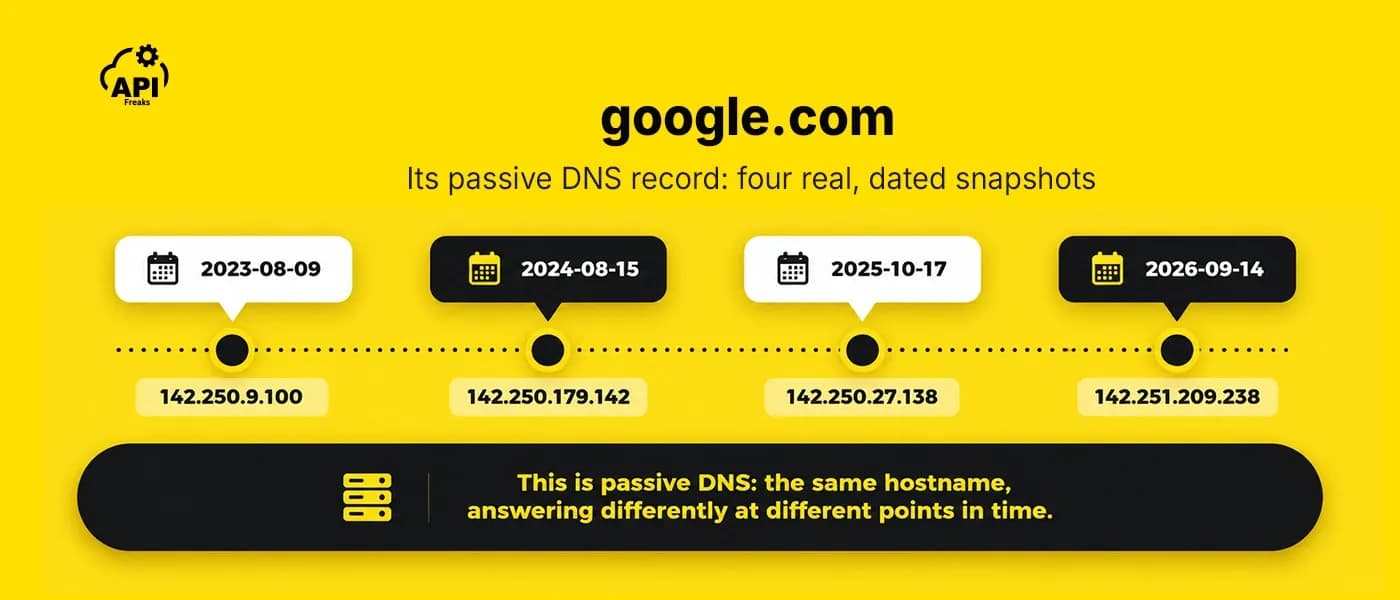

Passive DNS is a historical record of what a domain has pointed to, and when. It is built by watching DNS traffic that already happened, without sending any new queries of its own. It answers a question ordinary DNS was never designed to answer: not what a domain resolves to right now, but what it resolved to before, and what else has been seen pointing to the same address.
Threat hunters hit this gap all the time. An incident response investigation needs to know what a domain pointed to during the actual attack window, not today. A phishing takedown needs proof of infrastructure history to make its case. A SIEM alert names a domain that's already been torn down by the time anyone looks at it. A live DNS lookup can't answer any of that. It was built to answer one question, right now, and it keeps no memory of yesterday.
Key Takeaways
- Passive DNS is a historical record of past DNS resolutions, built by observing traffic that was already happening. It is not a live lookup, and it is not a DNS record type.
- Live DNS answers what is true right now. Passive DNS answers what was seen in the past, which ordinary DNS cannot answer at all.
- "Passive" describes a collection method, not a protocol feature. By the field's own founding definition, it means no cooperation from the domain owner and no extra DNS queries generated to gather the data.
- A standard passive DNS record holds the domain, record type, value, and timestamp. It does not record who made the original request.
- A domain's history can span years and several infrastructure changes, which no single live lookup can show.
- Threat hunters use passive DNS to track campaign infrastructure, catch fast-flux setups, pivot from indicators to related hostnames, investigate phishing domains, and reconstruct timelines.
- It has real blind spots: nothing shows up for a domain nobody has queried yet, internal and split-horizon DNS never appear in shared datasets, and there is always lag before a change becomes queryable history.
How Passive DNS Works
To see where a passive DNS record comes from, start with how a normal DNS lookup works. Passive DNS doesn't change that process or add a step to it. It sits alongside it and keeps a record of what it sees.
How a standard DNS lookup happens
When a client needs to resolve a name, it doesn't talk to the domain's own server directly. It asks a recursive resolver, the server most people never think about, usually run by an ISP or a public provider. If that resolver already has a cached, still-valid answer, it returns it immediately and nothing else happens.
If it doesn't, the resolver walks the delegation chain itself. It asks a root server, which points it to the server responsible for the relevant top-level domain (.com, .io, and so on). That TLD server points it to the domain's own authoritative nameserver, the one place that actually holds the real record. The resolver takes that answer, caches it for as long as its TTL allows, and hands it back to the client. Recursive resolver, root server, TLD server, and authoritative server are commonly called the four types of DNS servers, and those four roles cover the path a lookup normally takes.
The gap this reveals
Look at what that process leaves out: nothing in it keeps a record of what used to be true. A resolver's cache holds one answer until its TTL runs out. When a new answer replaces it, the old one is gone from the cache, and nothing in the protocol keeps a copy.
Florian Weimer's 2005 paper "Passive DNS Replication" is where the field starts. He described the limitation like this: "DNS only supports a single kind of query: given a domain name and a record type, all matching records are returned." So there is no DNS query for "what else has ever resolved to this address" or "what did this domain resolve to last month." Ordinary DNS was never built to answer either one. Weimer's own reason for building passive DNS was a related problem: PTR-based reverse lookup, the standard way to map an IP address back to a domain name, reads from a separate zone that isn't automatically updated when someone adds a new hostname.
Passive DNS fills that gap without changing how resolution works. Weimer defined it this way: "the passive part is intended to reflect the fact that no cooperation from zone owners is necessary, and that no additional DNS requests are generated." That sets it apart from two other ways to build a history. Polling a domain's records on a schedule means sending new DNS queries, which "raises some suspicion from DNS operators," and it only works if you already know which domains to watch. Pulling a zone file needs the zone owner's cooperation, and a zone like .com doesn't include the ordinary host records most investigations need. Passive DNS sends no queries and needs nobody's permission, because it only watches traffic that was already happening.
Where collection happens in practice
In practice, that means positioning a sensor somewhere it can see resolution traffic that's already flowing, for example just above a recursive resolver, catching a cache miss in the moment: the specific query and answer a resolver exchanges with the authoritative hierarchy when it doesn't already have a cached response. Weimer's own tool worked the same way. His paper describes a packet-capturing sensor with a filter that "might only forward authoritative answers," not a running log of every client request that never left the resolver's own cache.

Real passive DNS datasets also rarely come from a single tap point. They usually combine many observation points, such as ISPs, hosting providers, and partner networks, into one timestamped dataset.
What a Historical DNS Record Contains
A historical DNS record isn't a different kind of data from an ordinary DNS record. It's the same record types DNS has always used, captured with a timestamp attached. The APIFreaks DNS History API, for example, supports eight of them: A, AAAA, MX, NS, SOA, SPF, TXT, and CNAME.
Each one tells a different part of a domain's story, and each has its own reason to matter for an investigation:
- A / AAAA: where the name pointed, in IPv4 or IPv6. The most basic fact a lookup returns, and the one most useful compared across time, since a single current value says nothing about what it pointed to during the window an attack actually happened in.
- MX: which mail servers were responsible for handling a domain's email, and when that changed. A domain's MX history is a dated trail of where its mail was routed.
example.com's own current MX record is simply0 ., no mail server configured at all, a deliberate, queryable signal that the domain doesn't send mail and any message claiming to be from it is worth a second look. - NS: which nameservers held authority for the domain. A nameserver change is one of the more security-relevant events a domain can have, since it can mean the domain moved providers legitimately, or that its delegation was hijacked out from under its owner.
- SOA: the zone's own administrative record, serial number, refresh timing, the administrative contact. Useful mainly as a secondary signal that a zone was actively managed or changed around a given date.
- SPF / TXT: SPF records (technically published as TXT records) declare which mail servers are allowed to send on a domain's behalf.
example.com's current SPF record readsv=spf1 -all, meaning no server is authorized to send mail as this domain. If that record ever changed, the history would show when. TXT records more broadly often carry SPF, DKIM, or domain-verification strings, so they are worth tracking over time too. - CNAME: an alias pointing one name at another. Tracking CNAME history matters for the same reason A/AAAA history does: it shows what a name actually pointed to, one level of indirection removed.
A real example shows why this matters. The APIFreaks DNS History API's documentation shows example.com's nameserver records changing from a.iana-servers.net and b.iana-servers.net (seen in mid-December 2025) to hera.ns.cloudflare.com and elliott.ns.cloudflare.com (seen in mid-July 2026). That's a real move to Cloudflare, and it's visible only because someone kept a dated record of the old nameservers. A live lookup today shows only the new ones.
The same API's A-record history for google.com makes a related point at a much larger scale: thousands of historical A records on file, spanning back to 2023. Its IP addresses change constantly, which is what you'd expect from load-balanced infrastructure at that scale, and nothing about it is wrong. A single live lookup can't tell that routine churn from a real signal; only a timestamped history can, and a threat hunter has to make that call before treating any change as worth acting on.

Does Passive DNS Data Identify Anyone?
No. Standard passive DNS collection records the domain queried, the record type, the value returned, and a timestamp, not who made the original request. That's a protocol fact, not a policy choice: a resolver's own upstream query to an authoritative server carries the resolver's IP as its source, not the client's, so a sensor watching that traffic never has the client's identity to record in the first place (the one exception, EDNS Client Subnet, can carry a partial client-network hint upstream for CDN geo-targeting). That doesn't make the data harmless: DNS data in bulk still raises privacy questions, and Weimer's paper says so too.
Why Threat Hunters Use Passive DNS
Catching Fast-Flux Infrastructure
A domain whose A record rotates through many different IP addresses over a short window is a recognized indicator of fast-flux infrastructure, a technique attackers use to evade identification and takedown, as ICANN's Security and Stability Advisory Committee (SSAC) described in its 2008 advisory on fast flux hosting. What gives it away is the pattern: many different, often unrelated networks, paired with very short TTLs (the advisory gives one to three minutes as common). That's a different signature from the routine churn google.com's own A-record history showed earlier, which stays within one operator's own infrastructure.
A single live lookup only ever catches one address at one moment and can't show a pattern at all. Only a historical view, a sequence of dated snapshots with their TTLs intact, makes fast-flux identifiable in the first place. In practice that means pulling the A-record history for the window in question, counting the distinct IPs, reading the TTL on each record, and checking which networks those IPs belong to.
Mapping Attacker Infrastructure Over Time
Over the life of a campaign, the dated records for a hostname, and for the domain it sits under, show how its IPs, nameservers, and mail servers changed, not just where they stood when you noticed it. The useful part is lining those changes up: an IP, a nameserver, and a mail server that all change within the same few days could be one operator moving everything at once, or just a planned migration, and the dates against your incident window tell you which. A value that shows up in more than one indicator's history, such as the same IP or nameserver, is a lead worth following, though a lead is not a conclusion.
Pivoting to Related Infrastructure and Ownership
One indicator on its own is rarely the whole story. A hostname's DNS history gives you two places to start pivoting: the IPs the hostname has pointed to, and the nameservers of the domain it sits under. Each takes a different input and answers a question DNS history alone can't.

The APIFreaks Reverse DNS Lookup API takes one of those IPs and returns the other hostnames on record as having resolved to it. If several of them already look malicious on their own, that's a lead worth following: the same operator may be behind more than one of them, though anyone can point a hostname at any IP.
How much that lead is worth depends on how shared the IP is, and the response gives you a first read on that: it reports the total result count before you page through any results. A short list is worth a look, while a result set in the thousands usually means a heavily shared IP and says very little about who is behind any one hostname on it. Each hostname also carries the date of the DNS snapshot it was seen in, which helps separate the ones seen there around your indicator's time from the ones seen long before.
Nameservers are set for a zone, not for each hostname in it, so the nameserver pivot usually works on the domain the indicator sits under. On its own, a nameserver change there is ambiguous, because moving to a new DNS provider is routine and says nothing about who owns the domain.
Registration history adds more context to a nameserver change. The APIFreaks WHOIS History API takes a domain name and returns dated WHOIS snapshots for it. A snapshot can include the registrar, nameservers, domain status codes such as transfer locks, and, where they aren't redacted, registrant details. Nothing in the response flags a change, so you compare the snapshots on either side of the nameserver change yourself.
example.com is a simple case: in the API's documentation sample, its registrar is the same in the snapshots before and after its nameservers moved to Cloudflare. If a new registrar, a different registrant, or lifted transfer locks show up around the same dates instead, that's a reason to look closer, though not proof of a hijack: a sale or an ordinary registrar transfer looks the same. An unchanged registration doesn't clear the change either, because registrant fields are often redacted, and anyone who gets into the owner's registrar account can change nameservers without touching the registrar or registrant.
Investigating Phishing and Lookalike Domains
This isn't a new use case. Weimer's original 2005 paper lists phishing detection and trademark abuse among the field's founding applications, alongside malware command-and-control containment. Two decades later, the underlying technique hasn't changed.
A lookalike domain's own history is itself diagnostic: one first observed resolving only days before a phishing campaign launched is a very different signal from one with years of stable resolution behind it, and that first-seen date is exactly the kind of fact only a dated record can establish. The same history also shows what the domain pointed to, and whether its infrastructure connects back to other lookalikes, which can tie a scattered set of typosquatted domains back to one operator.
Reconstructing an Incident Timeline
A passive DNS record rarely gives the exact moment something changed, but it brackets it: the last dated snapshot with the old value and the first with the new one. That window is often what an incident timeline is missing, because it can be lined up against a specific alert or breach window in a way "sometime last year" can't. example.com's own history shows the idea: its nameservers were the IANA ones in the mid-December 2025 snapshots and Cloudflare's by the mid-July 2026 snapshot, so the change happened somewhere in between. Other dated sources can narrow it further: in the APIFreaks WHOIS History API's documentation sample, example.com lists the IANA nameservers on December 10, 2025 and Cloudflare's by January 2, 2026, which cuts the seven-month window to about three weeks.
How to Investigate a Suspicious IP Address does something similar, starting from an IP and adding WHOIS and geolocation data. If your alert gives you a hostname instead, DNS history is a good place to start.
What Passive DNS Can't Tell You
- Coverage gaps. A passive DNS record only exists for what was actually queried and observed while collection was happening. A domain nobody has looked up yet, a common situation for a freshly generated DGA (domain generation algorithm) domain before an attacker has even used it, simply has no history yet, no matter how suspicious the name itself looks. Catching that kind of domain early takes a different technique entirely, scoring the name itself rather than its resolution history, something passive DNS by definition can't do. The APIFreaks Domain Reputation API includes DGA detection, which scores the name itself.
- Internal and split-horizon DNS are invisible to shared datasets. Shared passive DNS datasets only ever see public, externally resolvable DNS traffic. An organization's internal Active Directory zones, or a split-horizon setup where internal and external resolvers return different answers for the same name, never show up in them at all, though a sensor on that organization's own resolvers would capture those names.
- Historical, not real-time. There's always some delay between something changing and that change becoming a queryable historical record. That's not the same as saying the data is stale, but it isn't a live feed either, and it shouldn't be treated as one.
How to Get Historical DNS Data Today
Historical DNS data is available in a few ways, and they differ mostly in who can get access and how much of the internet they see.
- Restricted community services. Some are run for vetted users only. CIRCL's passive DNS service is one: its own page says access is restricted to trusted partners, and you request it by contacting them with your affiliation and intended use.
- Your own sensors. You can capture passive DNS from your own resolvers, which is how Weimer's original tool worked. The data reflects your own network's traffic, so it can't show history for a domain your users never looked up.
- A hosted API. Several providers sell historical DNS data as an API, and their access and pricing models vary, so check what each one requires before building on it.
The APIFreaks DNS History API is one self-serve option: instant, with no vetting step, and pay-as-you-go. Create a free account, grab an API key, and the whole integration is one authenticated GET request:
import requests

url = "https://api.apifreaks.com/v1.0/domain/dns/history?host-name=example.com&type=all&page=1"
headers = {"X-apiKey": "API-KEY"}

response = requests.get(url, headers=headers)
print(response.text)
That call returns dated snapshots of a hostname's A, AAAA, MX, NS, SOA, SPF, TXT, and CNAME records, paginated for hostnames with long histories, at 35 credits per successful call. The free tier includes 10,000 credits with no card required, enough to pull a real hostname's history and see the shape of the data before deciding whether to build on it. For anything beyond a one-off script, the official APIFreaks Python SDK wraps the same endpoint as a typed client method instead of a raw call, useful once this becomes a scheduled job rather than a single lookup.
Frequently Asked Questions
What is passive DNS in one sentence?
Passive DNS is a historical record of past DNS resolutions, built by observing DNS traffic that already happened rather than sending new queries, and it's what lets you look up what a domain resolved to at a specific point in the past.
What are the four types of DNS servers, and how do they relate to passive DNS?
The recursive resolver, root server, TLD server, and authoritative server are the four roles involved in an ordinary DNS lookup. Passive DNS doesn't add a role to that process; it observes the traffic those roles already generate and keeps a timestamped copy of it.
How is passive DNS different from a regular, live DNS lookup?
A live DNS lookup can only tell you what a domain resolves to right now. A passive DNS record shows what it resolved to at points in the past, already collected and dated, which is a different question a live lookup has no way to answer.
Does passive DNS data include who made the request?
No. Standard passive DNS records the domain, record type, value, and timestamp, not the identity of whoever originally queried it. That follows from where the data comes from: the resolver's own upstream query carries the resolver's IP, not the original client's.
How far back does historical DNS data usually go?
It depends entirely on how long a given collection has been running and what it retained. Some datasets go back years for widely queried domains; a domain nobody looked up before a given date simply won't have earlier history.
Can passive DNS data feed a SIEM or threat intel platform?
Yes. Feeding indicator hostnames through an API like the APIFreaks DNS History API, on a schedule or when an alert fires, and pushing the dated record history into a SIEM or SOAR platform lets analysts see infrastructure changes alongside each alert, without leaving their normal triage view.
Is passive DNS the same thing as a DNS record type?
No. A record type (A, MX, NS, and so on) describes what kind of data a DNS record holds. Passive DNS describes how that data was collected and preserved over time. The two ideas are often mentioned together, but they answer completely different questions.
Can passive DNS show whether a domain was hijacked?
It can show the evidence, not the verdict. A sudden nameserver or A-record change that lines up with an incident window is worth checking against registration history, where a new registrar, registrant, or lifted transfer lock is a reason to look closer. A provider move with no registration change is often routine, but it doesn't rule out a hijack, since anyone with access to the owner's account can change nameservers without touching the registration.