Loading
IP to Domain Lookup - Find Every Domain Hosted on an IP Address
Enter an IPv4 or IPv6 address, or a CIDR block - e.g. 8.8.8.8 or 8.8.8.8/24 - and run a reverse IP lookup that returns every domain pointing to that IP via DNS records: the exact total count and the complete domain list, paginated 100 per page, with a last-seen date for each. Built for security analysts, sysadmins, and developers who need the full domain inventory behind an IP in one query.
Only need the canonical PTR hostname for an IP? Use the free IP to Hostname Lookup
What a Reverse IP Lookup Reveals
DNS works in two directions, and most people only ever use one of them. The everyday direction - domain name to IP address - happens silently every time you open a website. The other direction, IP address to domain, is where things get interesting for anyone investigating, auditing, or operating a network.
This utility runs a reverse IP lookup, also called a passive reverse DNS lookup: it returns every domain with a DNS A or AAAA record currently pointing at the IP you enter - or at an entire CIDR block, if you pass one. For a dedicated server that might be a handful of domains; for a heavily shared or CDN IP like 1.1.1.1, it can mean hundreds of thousands. Alongside the full list you get the exact total count and a last-seen date for every domain-to-IP mapping.
That's a different question from "what does this IP call itself?" - the single canonical PTR hostname an IP's owner configures. For that, use the free IP to Hostname Lookup . This utility is for the bigger question: tracing an attacker's infrastructure, auditing the hosting neighbourhood your website lives in, or mapping every site that shares a server.
What Would You Get From This Tool?
Every reverse IP lookup returns three things about the IP you enter: how many domains resolve to it, the full list of those domains, and when each one was last seen pointing there.
| Output | What it tells you |
|---|---|
| Total records | The exact number of domains resolving to the IP - a precise count, not an estimate. A figure in the tens of thousands signals a shared or CDN-fronted host; a handful signals a dedicated server. Use it to read server density at a glance. |
| Domain list | The complete set of domains resolving to the IP, paginated 100 per page - every record, not a sample. Browse the full hosting neighbourhood in one place, no manual digging. |
| Last seen | For every domain in the list, the most recent date its mapping to the IP was observed - so you can separate live relationships from stale, historical ones. |
How to Use the IP to Domain Lookup?
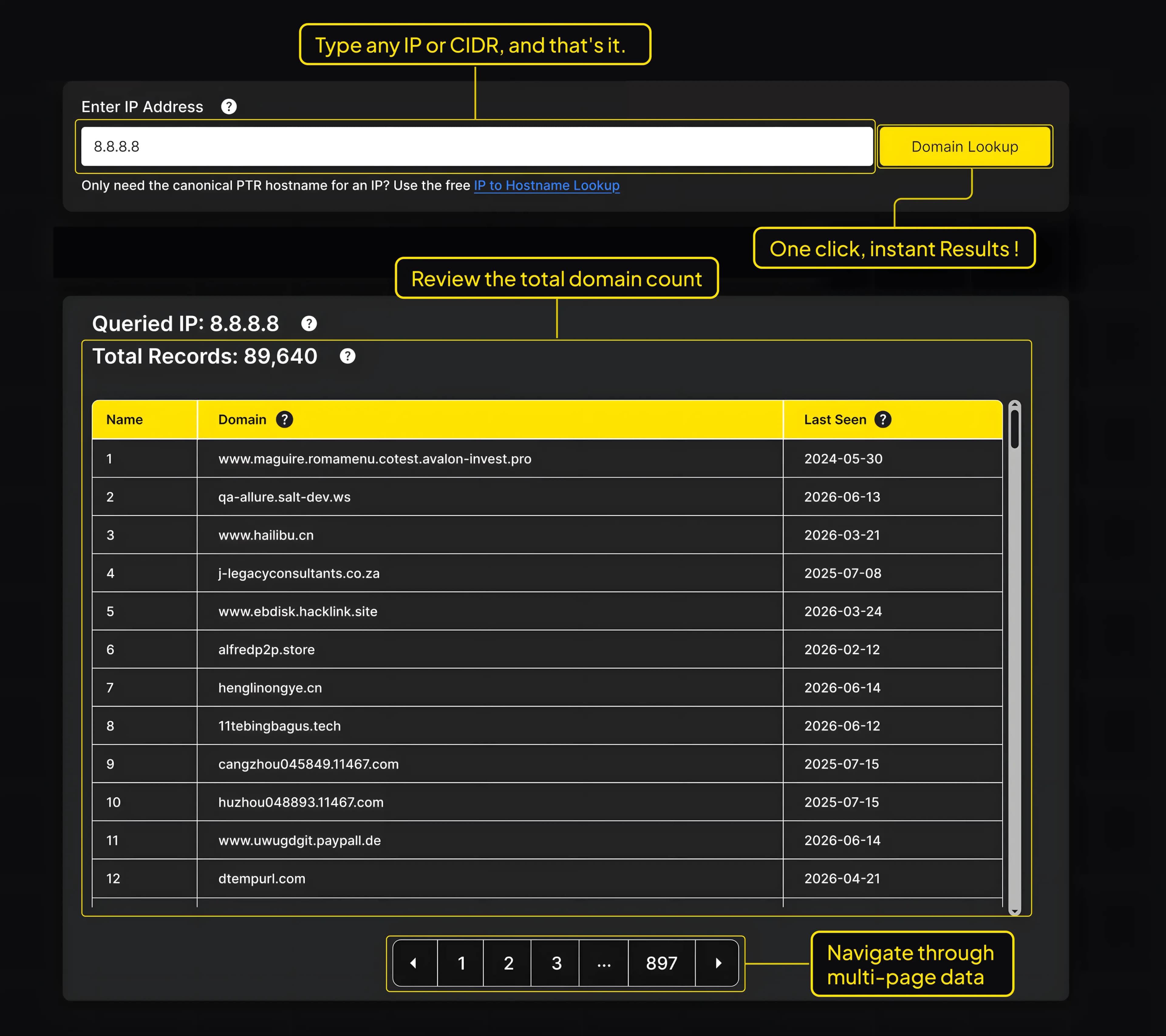
This is a subscriber-only utility - you'll need an active APIFreaks subscription and to be signed in before running a query. New accounts start with 10,000 free credits.
- Sign in to your APIFreaks account at apifreaks.com/login.
- Navigate to Utilities → IP to Domain Lookup or go directly to apifreaks.com/utilities/ip-to-domain-lookup.
- In the Enter IP Address field, enter the IP address you want to look up, for example 1.1.1.1.
- Click the Domain Lookup button. Within seconds, the tool returns the results.
- Review the total domain count, then page through the complete domain list and last-seen dates.
Tips for Best Results
- Use IPv4 addresses in dot-decimal notation (e.g., 8.8.8.8). Most public-facing servers are reachable this way.
- For a CDN-shared IP (Cloudflare, Fastly, Akamai), expect very large counts as the IP is shared across many customers.
- If you're investigating a domain rather than an IP, run a forward DNS lookup first, take the resulting IP, and feed it back into this tool.
Use Cases
The reverse IP lookup opens a broad set of use cases for anyone investigating, auditing, or operating a network.
Security Research & Threat Intelligence
When a suspicious IP appears in a firewall log or threat feed, the first step is mapping the infrastructure behind it. Reverse DNS Lookup reveals the full set of domains hosted on that IP, often surfacing co-located malicious sites, phishing kits, or command-and-control hostnames that share the same server.
Shared Hosting Reputation Analysis
Search engines and email providers factor in the reputation of your hosting neighbourhood. If you're on shared hosting, the other websites on your server can affect your domain's deliverability, blacklisting risks, and search rankings. Use Reverse DNS Lookup to audit how many domains share your server IP and decide whether it's time to move to dedicated hosting.
Penetration Testing & Reconnaissance
During the reconnaissance phase of a sanctioned pentest, reverse IP address lookup is a standard technique for expanding the known attack surface of a target organization. A seemingly hardened primary domain may be co-hosted with a less secure sister site. Identifying all domains on an IP is a foundational step in building a full target profile. Pass a whole CIDR block (e.g. 203.0.113.0/24) instead of a single address to map every domain across an organization's allocated range in one query.
Domain & Server Migration Planning
Before changing the server's IPs or migrating to a new host, sysadmins need an authoritative list of every domain currently pointing to the old IP. Reverse DNS Lookup provides this list in one query, far faster than walking through DNS panels for every domain.
Brand Protection & Phishing Investigation
Phishing operations often cluster impersonation domains on shared infrastructure. Reverse Lookup on the IP behind one phishing site frequently uncovers the entire campaign's domain set, providing evidence for takedown requests and registrar abuse reports.
Digital Forensics & Legal Investigations
Legal and compliance teams investigating digital fraud, copyright infringement, or other cyber incidents often need to document the full set of domains associated with a specific IP. Reverse DNS Lookup provides a list of records for use in reports and legal proceedings.
How a Reverse IP Lookup Works
A forward DNS lookup answers "what IP does this domain point to?" A reverse IP lookup answers the opposite question: "which domains point to this IP?" To do that, it doesn't query the IP directly - there's no single DNS record that lists every domain on an address. Instead, the lookup reads a large, continuously built index of DNS A and AAAA records collected from across the internet, and returns every domain whose record currently resolves to the IP you entered.
That index is what makes the result complete rather than a guess. When you enter an IP - or a CIDR block - the tool matches it against every A/AAAA record it has seen pointing there, returns the exact count, and lists each domain with the date its mapping was last observed. For a dedicated server that may be a few domains; for a shared host or a CDN edge IP, it can run into the tens or hundreds of thousands.
One thing a reverse IP lookup can't promise: a perfectly real-time, exhaustive view. DNS changes constantly, and an index reflects what has been observed, not what changed in the last few seconds. The last-seen date is there for exactly this reason - it tells you whether a domain-to-IP mapping is current or historical, so you can weigh each result instead of treating them all as live. A domain that last resolved to the IP two years ago is a different signal from one seen yesterday.
Frequently Asked Questions
Because many domains can share one IP. Shared hosting, CDNs, and large anycast addresses serve thousands of sites from a single address, and the lookup returns every domain whose DNS record resolves there. A figure of 87,036 for 8.8.8.8 is normal for a heavily shared IP; a dedicated server might return only a handful. The total count is the fastest read on how crowded an address is.
The tool returns the complete domain list for the IP, paginated at 100 records per page - not a capped sample. The total count tells you how many pages to expect. For programmatic access or feeding results into a pipeline, the Reverse DNS Lookup API (linked in the CTA near the top of the page) returns the same complete set as structured JSON.
Yes. Enter a CIDR block such as 203.0.113.0/24 and the lookup returns every domain resolving to any address in that range, with the same total count and last-seen dates. It's the fastest way to map every domain across an organization's allocated range in one query instead of checking addresses one at a time.
Yes. Enter any IPv6 address and the lookup returns the domains resolving to it from AAAA records, exactly as it does for IPv4 from A records.
DNS changes over time, and the index reflects what has been observed rather than only what's live this second. The last-seen date tells you when each domain-to-IP mapping was most recently confirmed, so you can separate current relationships from stale, historical ones - essential when you're using the data for security or forensic work.
Results come from a continuously updated reverse-DNS index, not a one-off live query, so very recent DNS changes may not appear immediately. The last-seen date on every row shows how current each mapping is, so you can judge each result rather than assuming all are real-time.
Yes, with a caveat worth understanding. For a CDN or shared IP, the lookup returns the many domains that resolve to that shared address - which is often exactly what you want when mapping a hosting neighbourhood. If instead you need the single canonical hostname the IP identifies itself by, that's a PTR lookup, which the free IP to Hostname Lookup tool handles.
The free IP to Hostname Lookup answers one question: what hostname does this IP's PTR record point to - a single, canonical name set by the IP block owner. This utility answers a bigger one: which domains are hosted on this IP - returning the exact total count and the complete domain list, paginated 100 per page, with a last-seen date for each. If you only need the PTR hostname, the free tool covers it; if you need the full domain inventory behind an IP, use this utility.
No - this tool takes an IP address (or CIDR block) as input. To go the other direction, use the free Bulk Domain to IP Lookup tool, or query forward DNS records (A, MX, NS, TXT) programmatically with the DNS Lookup API.
It's a subscriber utility - you'll need an active APIFreaks account and to be signed in. New accounts include 10,000 free credits with no credit card required, which is enough to run a large number of lookups before choosing a plan.
It tells you which domains resolve to an IP, not who owns the IP, what's running on it, or whether a domain is currently active. It's also a point-in-time read of an observed index - for how an IP's domain set changed over time, use the DNS History API. Treat the results as a map of DNS relationships, not a statement of ownership or live service.