IPv6 Checker - Test Website, Name Server & Mail IPv6
IPv6-only clients can reach your domain only if its DNS says so. This IPv6 compatibility checker tests the domain, not your own connection: one live AAAA record lookup covers the website, its name servers, and its mail servers, and scores each layer so you can see exactly where IPv6 coverage stops.
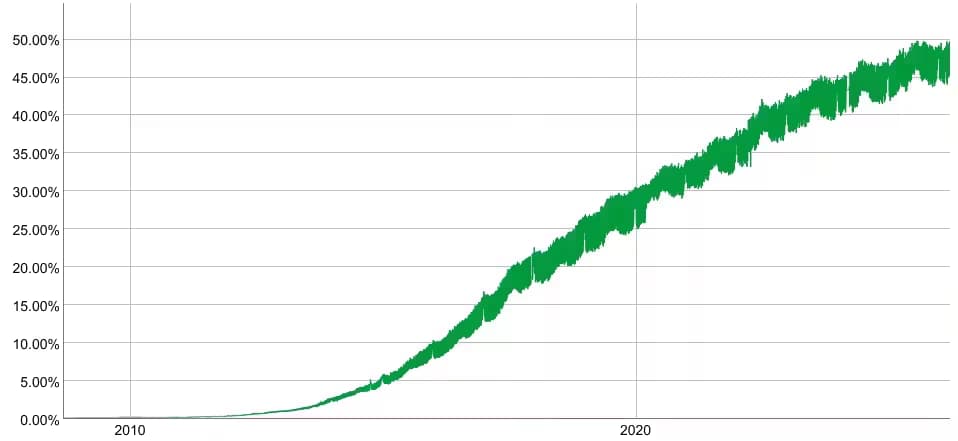
IPv6 adoption is no longer a distant infrastructure concern — it is a present-day operational reality. Google's public statistics show IPv6 traffic consistently above 45% of requests globally, with mobile networks in countries like China, India, and the United States running majority IPv6 traffic. As ISPs complete their transition away from IPv4, domains that have not published AAAA records will become harder for IPv6-only clients to reach, and the window to address this is shrinking.
Most IPv6 test tools on the web check whether your internet connection supports IPv6. This tool does something different: it checks whether a domain's DNS infrastructure is IPv6-ready. That distinction matters if you are a developer, sysadmin, or website owner trying to verify that your domain, not just your ISP, is ready for IPv6 traffic.
This tool performs the following three live DNS lookups in one request:
- It queries the domain's authoritative nameservers for AAAA records, the DNS record type that maps a hostname to an IPv6 address. An AAAA record lookup returning at least one result is the primary signal of IPv6 support, and it is what decides whether the website itself is reported as reachable over IPv6.
- It queries whether the domain's authoritative name servers publish their own AAAA records. This matters because IPv6-only DNS resolvers need to be able to reach the nameserver layer over IPv6 to perform lookups at all.
- It queries the AAAA records of the domain's MX mail servers, which determines whether inbound and outbound email can flow over IPv6 connections.
dig, nslookup, or manual record parsing. The tool is free to use without a signup, works for any publicly resolvable domain including subdomains, and pulls live DNS data on every query rather than serving cached results. For automated IPv6 testing at scale, the same lookups are available programmatically through the APIFreaks DNS Lookup API.One AAAA Record Lookup, Three Layers of Results
Run a domain through this checker and you get four outputs:
- IPv6 Readiness Verdict: A plain-language answer at the top of the results, plus three cards scoring the website, the name servers, and the mail servers separately. The headline answers “does this website support IPv6” directly, and the detail line names anything that is only partly ready — a domain with AAAA records but IPv4-only mail says so instead of reporting a flat "Yes". This is the fastest possible IPv6 support check for a domain, without running a dig AAAA command yourself.
- AAAA Records: Every IPv6 address published directly for the domain, pulled from its authoritative nameservers and written in the compressed RFC 5952 form you would paste into a DNS zone, with a copy button on each one. Multiple addresses here typically indicate load balancing, CDN routing, or redundant endpoints. An empty section confirms the domain has no AAAA records - which is an actionable finding that tells you exactly what needs to be added.
- Name Servers: Each authoritative name server for the domain with its IPv6 addresses, and a count of how many are reachable over IPv6. IPv6-capable nameservers matter because resolvers on pure IPv6 networks need to reach the NS (nameserver) layer over IPv6 to perform DNS lookups at all. Any nameserver that is IPv4 only is listed and labelled, because a partial count can silently break DNS resolution for IPv6-only clients even when the domain has AAAA records.
- Mail Servers: The IPv6 addresses of the domain's MX targets. Mail servers with AAAA records can send and receive email over IPv6 connections, which matters for deliverability when communicating with IPv6-only mail infrastructure. An empty table means the mail servers have not yet published AAAA records.
Together, these four outputs replace what would otherwise require three separatedigqueries across different record types, followed by manual interpretation of the output.
How to Use This Tool
- Enter the Domain in the Input Field Type the bare hostname, for example, github.com or api.example.com. Pasting a full URL works too - the tool pulls the hostname out of it and shows you what it is about to check. Subdomains are supported and are treated as independent hostnames in DNS, so they may return completely different results than the root domain.
- Click "Check IPv6 Compatibility" The tool performs three simultaneous DNS lookups against the domain's authoritative nameservers and returns live results. There is no cache layer. You are seeing the current state of the domain's DNS zone.
- Read the Verdict at the Top The banner gives you the headline result in a sentence, and the three cards beneath it score the website, name servers, and mail servers separately. If the domain is not registered at all, the tool says so rather than reporting it as IPv4-only - so a typo reads as a typo.
- Inspect the AAAA Records This section shows the IPv6 addresses published directly for the domain, each with a copy button. Multiple records here indicate load balancing or CDN distribution. An empty section tells you that adding AAAA records is the first task in any IPv6 migration for this domain.
- Review the Name Servers Check whether the authoritative nameservers for the domain also have AAAA records. If this table is empty while the AAAA Records table is populated, the website itself is IPv6-reachable, but DNS resolution may fail for clients on IPv6-only networks that cannot reach an IPv4-only nameserver.
- Review the Mail Servers Check whether the domain's MX servers publish AAAA records. This is especially relevant for mail administrators verifying that inbound email delivery works correctly for IPv6-only senders.
Reading Partial IPv6 Readiness
True IPv6 readiness means AAAA records exist across all three layers: the website, its nameservers, and its mail servers. Partial coverage is the normal case rather than the exception, so the verdict says which layer falls short instead of collapsing everything into one Yes or No - a domain whose website answers over IPv6 but whose mail servers do not is reported as exactly that.
Use Cases
Confirm AAAA Record Propagation after DNS Changes
When you publish new AAAA records, DNS propagation can take anywhere from minutes to 48 hours depending on the TTL of the previous records. Use this tool to verify that the records are live and visible from the public internet without waiting for propagation to complete elsewhere.
Audit Client and Vendor Domains for IPv6 Readiness
Agencies, managed service providers, and procurement teams can quickly verify whether the domains they manage or partner with are IPv6-ready. Running a domain through this checker takes five seconds and gives you the details you need for a compliance or audit report.
Diagnose Connectivity Failures from IPv6-only Clients
If users on mobile carriers, enterprise VPNs, or IPv6-only networks report that they cannot reach a site, the first diagnostic step is verifying whether the domain publishes AAAA records at all. This tool gives you the answer without needing access to the server or the hosting environment.
Check nameserver IPv6 Support before DNS Migration
Before migrating a domain to a new DNS provider, verify that the new provider's nameservers have their own AAAA records. The Name Servers section counts how many are reachable over IPv6 and flags any IPv4-only nameserver that could cause resolution failures for IPv6-only clients after the migration.
Run an IPv6 Mail Test on Your MX Hosts
The Mail Servers section doubles as an IPv6 mail test: it looks up AAAA records for every MX host the domain publishes. Mail admins use it to confirm inbound email from IPv6-only senders has a native path, and to catch MX hosts still labeled IPv4 only after a provider migration.
Competitive and Industry Research
Researchers, SEO practitioners, and infrastructure analysts tracking IPv6 adoption can audit domains across an industry to benchmark who has made the transition and who has not.
Pre-launch IPv6 Readiness Checks
Before a new domain goes live, run it through this IPv6 site checker to verify that AAAA records are in place, so the site is reachable by the broadest possible audience from day one \u2014 including the growing share of mobile users on IPv6-native carrier networks.
Education and Hands-on Learning
dig or configure a local DNS resolver.FAQs
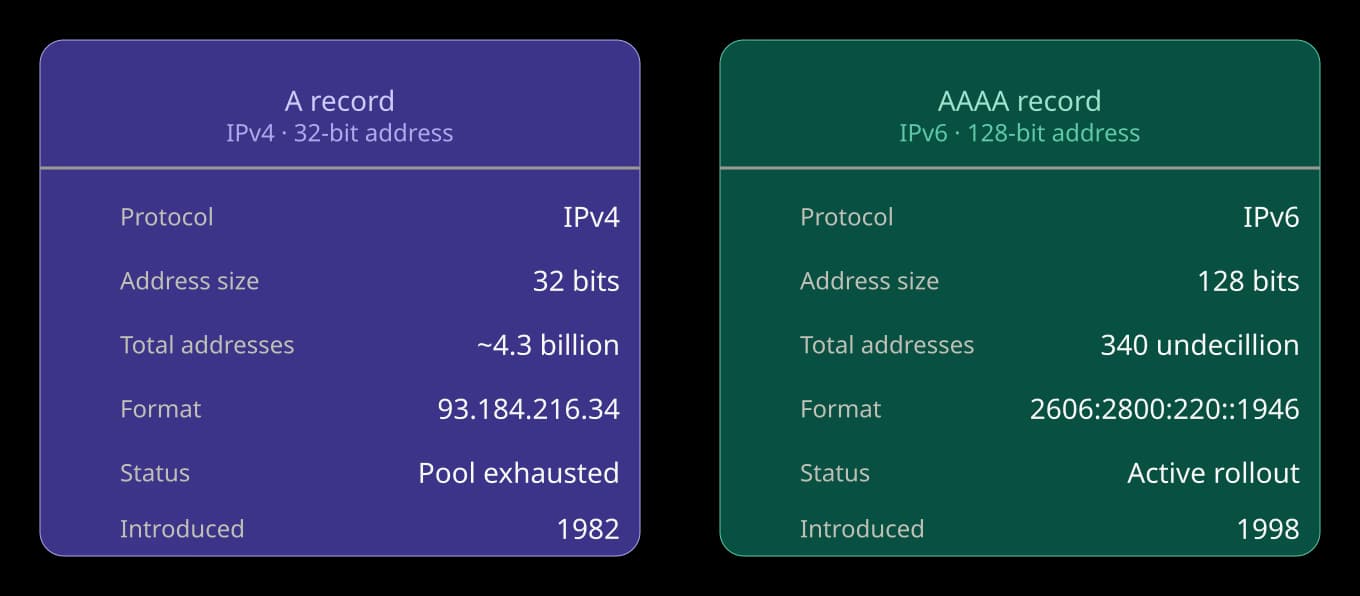
An AAAA record maps a domain name to a 128-bit IPv6 address. It is the IPv6 equivalent of the A record, which maps to a 32-bit IPv4 address. A domain needs at least one AAAA record for IPv6-connected clients to be able to resolve and reach it. To see how an IPv4 address is written in IPv6 notation, use the IPv4 to IPv6 Converter.