CAA Records Generator
Say which certificate authorities are allowed to issue SSL certificates for your domain, and get the DNS records that enforce it. Pick from 60+ authorities, set wildcard and non-wildcard separately, and copy the output in whichever format your DNS provider expects - Generic CAA, BIND zone, Legacy TYPE257, tinydns or dnsmasq.
- Enter the domain you want to publish CAA records for, such as example.com. CAA records on the registered domain apply to every subdomain underneath.
- Pick the CAs you want to authorize. Each CA shows separate Non-Wildcard and Wildcard toggles once selected.
- A reporting address - email or URL - where certificate authorities can notify you of policy violations or misissuance attempts.
Who actually issued that certificate?
A CAA record says who may issue. It does not tell you who did. The SSL Certificate Lookup API returns the issuer on the certificate a domain is serving, so a certificate from a CA you never authorized shows up - on one domain, or across every domain you look after.
10,000 free API credits, no card required.
What You Get From This Tool
- Five output formats. Generic CAA, BIND zone file, Legacy TYPE257 (RFC 3597 hex), tinydns and dnsmasq - each with its own copy button, so moving a policy into a zone file is one click.
- 60+ certificate authorities. From Let's Encrypt and DigiCert to Buypass, Certigna and NAVER Cloud Trust Services. Authorities the browsers have distrusted are not in the list, and picking one writes the exact name the CA checks for - no authorizing
www.digicert.comwhen onlydigicert.comcounts. - Wildcard and non-wildcard set separately. So a CA you trust for *.example.com is not automatically trusted for the apex, and the tool works out the record combination that says so.
- Your current policy, loaded in. Load My Records pulls what a domain publishes today so you can edit it rather than retype it. Anything it cannot match to a known authority is named, not quietly dropped. To read a policy without editing it, use the CAA record checker.
- Optional iodef contact. Add a security address and CAs can tell you about policy violations and attempted misissuance.
- Free, no sign-up. As many domains as you need. Copy the output to your DNS provider and move on.
How to Use the CAA Records Generator
- Enter the domain name Type the registered domain you want to protect, such as example.com. CAA records are usually set on the registered domain so they apply to every subdomain underneath.
- Choose a starting point Pick one of three options under Start from:
- Start Over - clears everything, for when you're building a policy from scratch.
- Load Example - fills in a typical policy, Let's Encrypt and Sectigo for both standard and wildcard certificates, so you can see the shape of one and edit from there. It keeps whatever domain you have already typed.
- Load My Records - reads the CAA records your domain publishes right now and fills the form in with them. The fastest way to amend a policy that already exists.
- Select certificate authorities Open the CA dropdown and pick every authority you want to allow. The list includes 60+ publicly trusted CAs - Let's Encrypt, DigiCert, Sectigo, GlobalSign, GoDaddy, Google Trust Services, Amazon Trust Services, Buypass, ZeroSSL-adjacent providers and many regional CAs.
- Toggle wildcard and non-wildcard per CA For each selected CA, tick or untick:
- Non-Wildcard - allows the CA to issue standard certificates (issue tag in CAA syntax).
- Wildcard - allows the CA to issue *.example.com certificates (issuewild tag).
- Add an iodef email (optional) If you want CAs to notify you of policy violations, enter a reporting address in the iodef field. Use a security contact you actively monitor - most CAs will email this address before they issue a certificate that conflicts with your policy.
- Click Generate CAA and copy the output The tool returns five output blocks. Use whichever your DNS provider supports:
- Generic CAA Records - works on Cloudflare, Route 53, Namecheap, DNSimple, most modern panels.
- Standard BIND Zone File - paste straight into a zone file managed with BIND or compatible tooling.
- Legacy Zone File (TYPE257) - for nameservers without native CAA support. Uses the RFC 3597 hex format.
- tinydns - for djbdns and tinydns-based servers.
- dnsmasq - for dnsmasq deployments using --dns-rr.
If neither box is ticked, the CA is excluded entirely. If only Wildcard is ticked, the CA can issue *.example.com but not example.com - useful for splitting trust across providers.
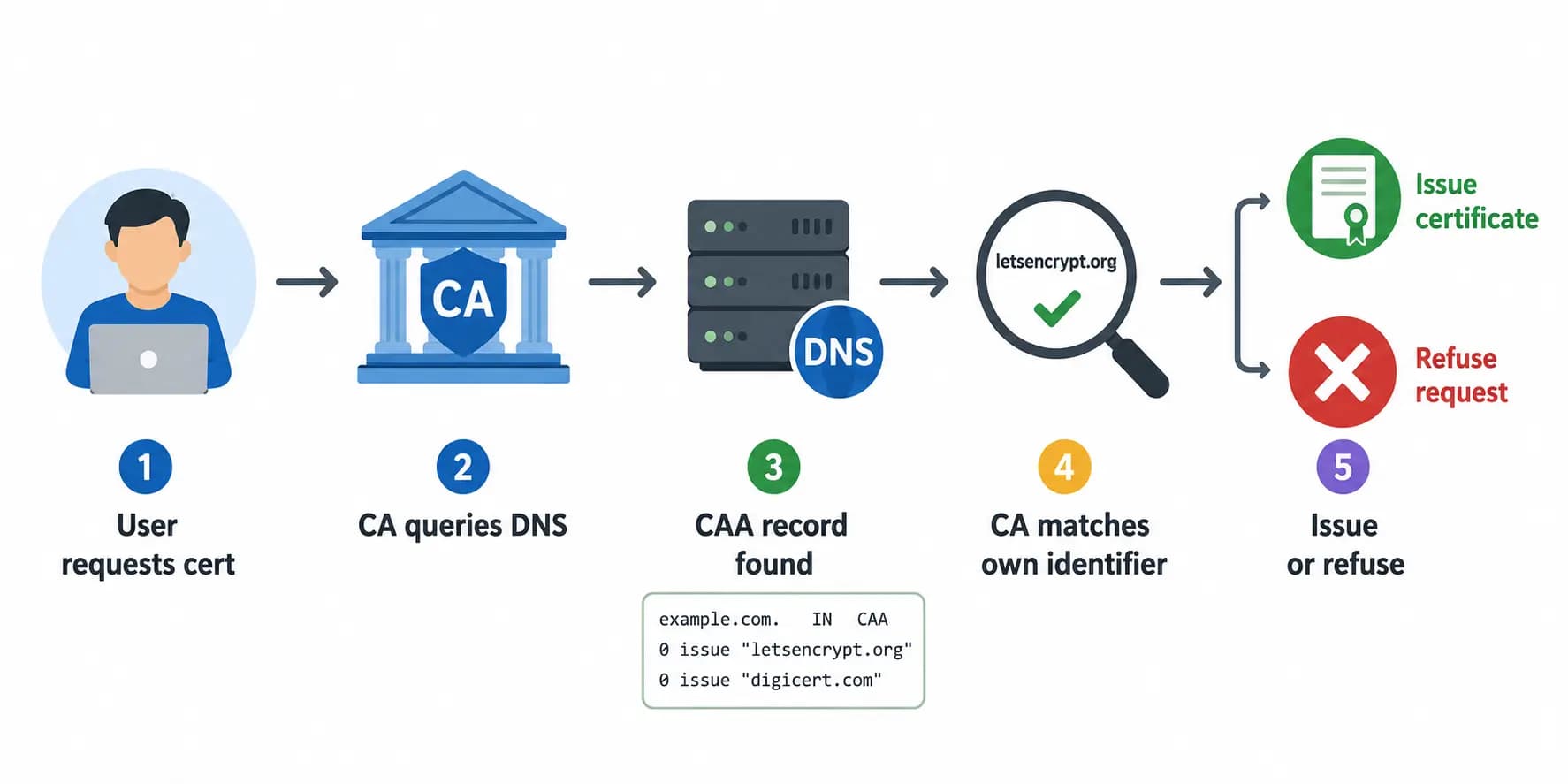
Paste the records into your DNS provider, save, and wait for propagation. Most CAs check CAA at issuance time, so the policy is enforced as soon as the records are live.
Example Output Explained
Use it as a complete CAA record example you can adapt: swap the domain and the authorities and the structure stays the same.
For domain apifreaks.com with Actalis, Let's Encrypt, and Sectigo authorized for both wildcard and non-wildcard issuance, the generator returns the following records in each format:
Generic CAA Records
apifreaks.com	CAA	0 issue "actalis.it"
apifreaks.com	CAA	0 issue "letsencrypt.org"
apifreaks.com	CAA	0 issue "sectigo.com"
Standard BIND Zone File
apifreaks.com.	IN	CAA	0 issue "actalis.it"
apifreaks.com.	IN	CAA	0 issue "letsencrypt.org"
apifreaks.com.	IN	CAA	0 issue "sectigo.com"
What this policy enforces
Once these records are live, only Actalis, Let's Encrypt and Sectigo can issue SSL/TLS certificates - standard or wildcard - for apifreaks.com. If any other publicly trusted CA receives an issuance request for the domain, it must check these records first and refuse to issue.
CAA Record Anatomy
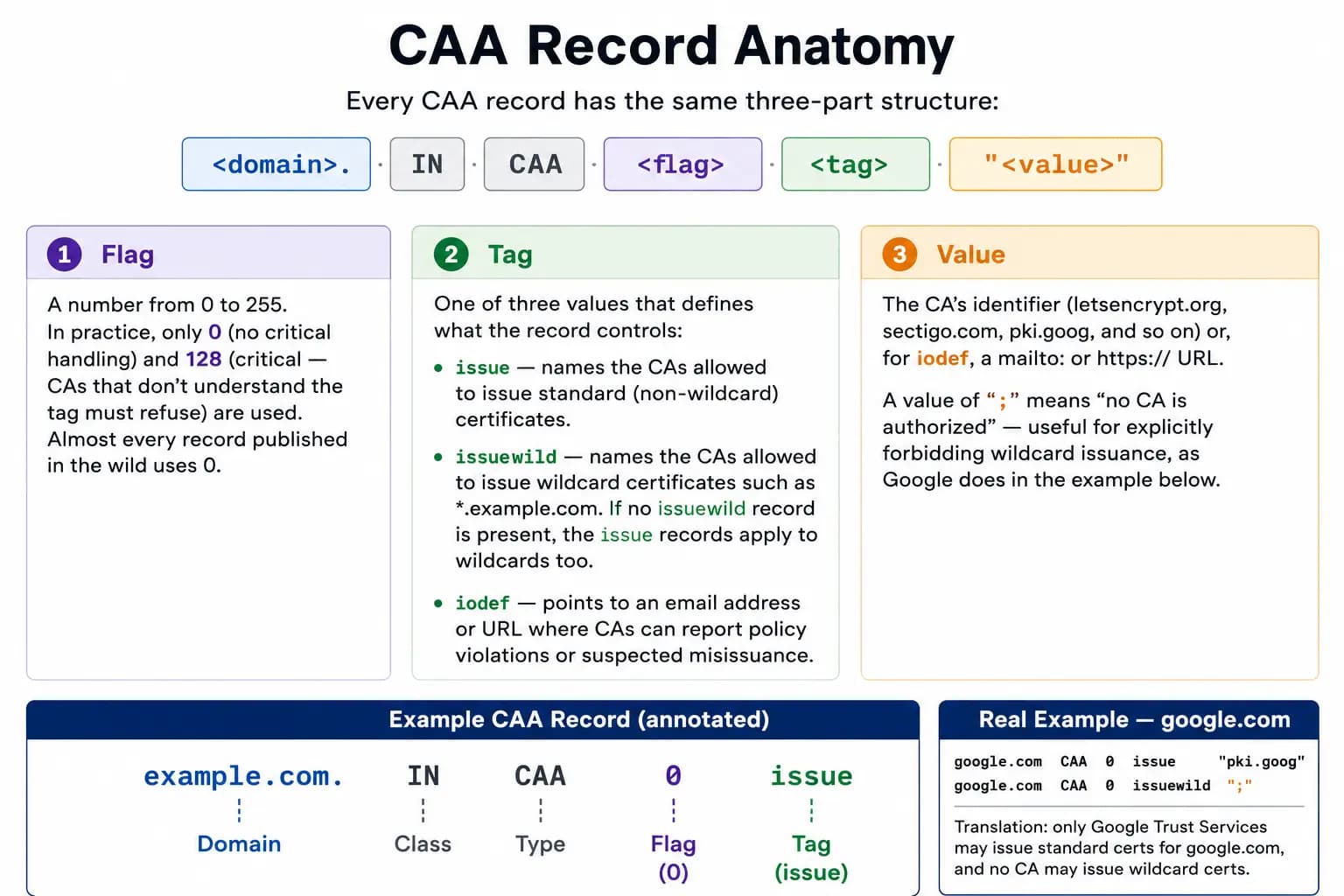
Every CAA record has the same three-part structure:
<domain>. IN CAA <flag> <tag> "<value>"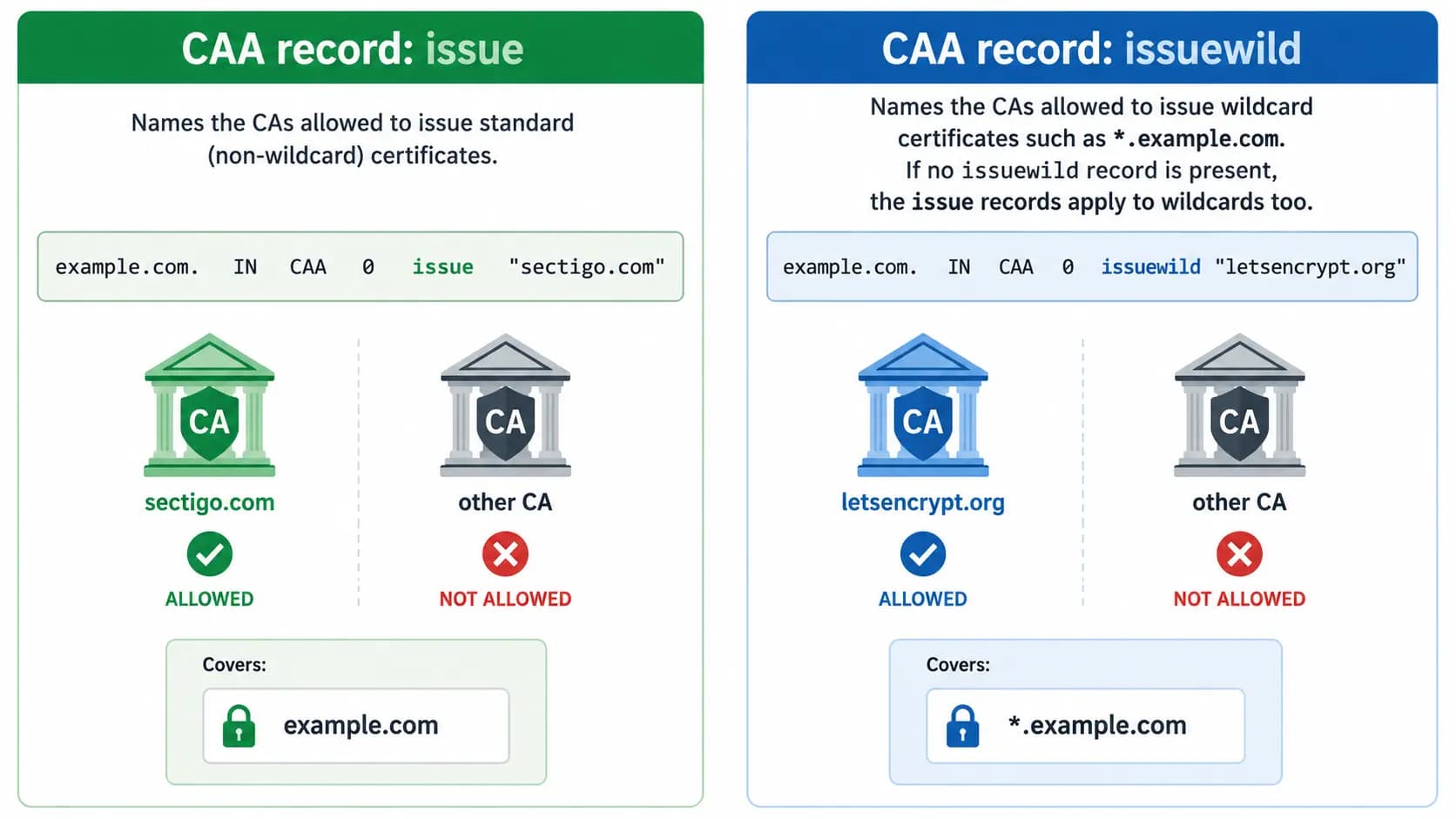
Real example - google.com
The Load My Records option on the tool returns this for google.com:
google.com CAA 0 issue "pki.goog"
google.com CAA 0 issuewild ";"
Translation: only Google Trust Services may issue standard certificates for google.com, and no CA may issue wildcard certificates. This is a strict policy any high-value domain can copy.
Use Cases
- Launching a new domain. Publish the policy before the first certificate exists, naming only the CA you intend to use. A request to anyone else is refused at validation.
- Keeping hundreds of domains consistent. Generate the canonical block once, then push the same records into every zone through your provider's API or Terraform. The output is text, so it scripts cleanly.
- Migrating between authorities. Add the new CA, deploy, get the certificate, then drop the old one after cutover. Loading the current policy first means you do not lose entries you still need.
- Running your own nameserver. Most CAA tools assume Cloudflare or Route 53. The five formats here cover software without a DNS panel - BIND zone syntax, tinydns and dnsmasq lines, and TYPE257 hex where native CAA is unsupported.
- Preparing for an audit. CAA is a control auditors increasingly ask about. Publish the policy and document the decision - "only these CAs are authorized" answers the question in PCI DSS, SOC 2 and ISO 27001 reviews.
FAQs
The generator creates a policy: you choose the authorities and it produces the CAA records to publish. The CAA Record Checker reads a policy - it fetches the records a domain already publishes and reports what they allow. Use the checker to audit, the generator to change. Load My Records bridges the two, pulling a domain's live policy into the generator for editing.
As soon as the records propagate, which depends on your zone's TTL - typically a few minutes to a couple of hours. CAs check CAA at issuance time, so the policy is enforced the next time anyone requests a certificate for your domain. To confirm the records went live, run your domain through our CAA record checker.